Open Notepad full screen mode
Question from user – Open Notepad full screen mode : Whenever i open notepad, it always open in small minimized window. How to make change in notepad default size to maximized or how to start notepad maximized?
Answer : In windows there are many programs which opens in minimized size or normal window size but you always have option to change its default setting. But before changing Notepad default size to maximize, you can always increase or maximize opened widow size by clicking the middle icon on the title bar. Its very easy to change opened window size but if you don’t want to repeat this step every time you open a program then you can change its default stetting – here are the steps –
- Create a Shortcut of NOTEPAD.EXE file(if its already there then ignore this step).
- Right click on the notepad shortcut and select properties option.
- In the properties dialog box, select shortcut tab and select maximized option.
- Next time when you will open notepad with this shortcut it will open maximized or full screen.
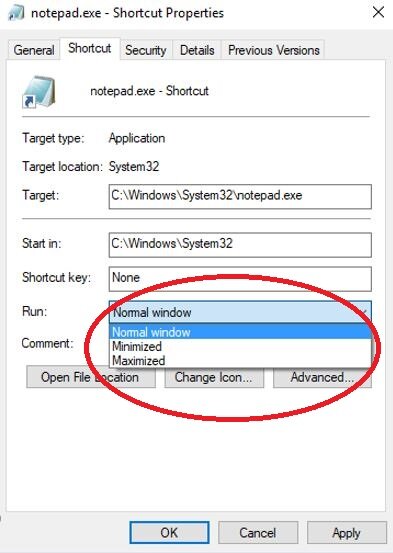
Open Notepad full screen mode
If you don’t want to use this method or looking some other method to open notepad in customized size (without using any specific shortcut file), then you can resize Notepad window as per your requirement. When you will open notepad next time it will remember the size which you customized last time. To do this follow steps –
- Open Notepad and right click on the top – title bar.
- Selecting ‘Size’ from the menu options and resize Notepad as per your need(with the arrow icon).
- Once you will close this Notepad window and open next time you will see customized window size.
Now after above method, if you close any Notepad file maximized (or customized) and open next time – It will open maximized or same size which you customized last time.