Diskpart Command
आज हम आपको बता रहे है Diskpart command के बारे मे | Microsoft Windows के अलग अलग Operating system versions के साथ Diskpart command आता है जिसकी help से अलग अलग disk related operations perform किये जा सकते है | Diskpart की help से boot, partitions, volume and RAID management operations easily perform किये जा सकते है | DiskPart को text-mode command interpreter भी कहते है जिसका अपना console होता है | Diskpart की अपनी shell या console होती है जो की separate windows मे run होते है | Diskpart console को open करने के लिए आपको अपने windows computer मे command prompt open करने के बाद diskpart command type करना होता है | Diskpart command enter करने के बाद ये अपना separate command console open करता है जिस पर diskpart के सभी commands perform किये जा सकते है |
डिस्कपार्ट एक बहुत powerful command है इसलिए इसको use करते वक़्त आपको सावधानी बरतनी चाहिए | यह command disk or volume का data बहुत easily remove कर सकता है इसलिए command execute करते वक़्त currently selected disk or volume को check कर लेना चाहिए |
Diskpart command निचे दिए गए Microsoft operating systems पर available होता है –
- Windows 2000
- Windows XP
- Windows Vista
- Windows 7
- Windows 8
- Windows 10
डिस्कपार्ट की help से निचे दिए गए important task perform कर सकते है वो है –
- Create partitions
- Remove partitions
- क्रिएट एंड एक्सटेंड वॉल्यूम
- Remove formatting
- Assign and remove ड्राइव लेटर्स
- Convert disks from basic to dynamic
डिस्कपार्ट को कैसे use करते है –
- Open command prompt on your windows OS
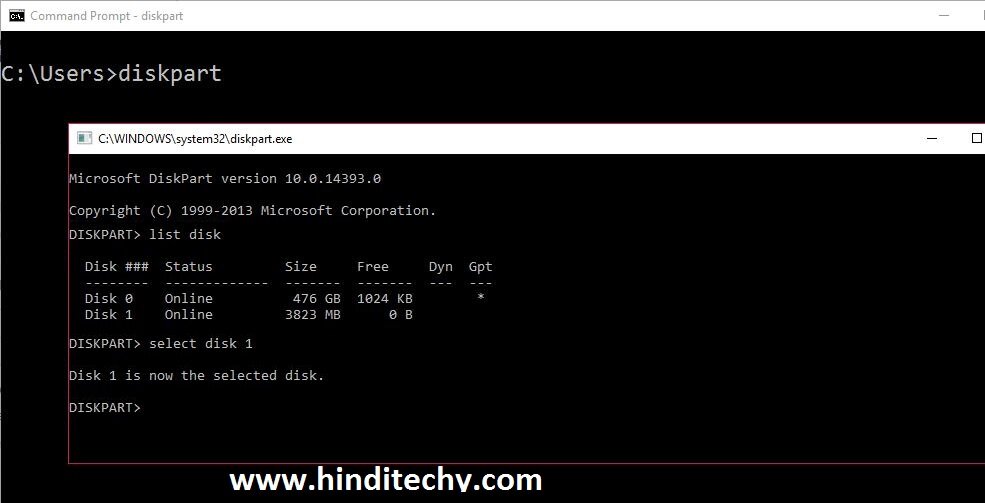
- Type “diskpart” (without quotes) on command prompt
- यह आपको डिस्कपार्ट की अलग separate shell open कर dega जहाँ पर आप डिस्कपार्ट के commands execute कर सकते है |
- किसी भी disk or volume पर command execute करने से पहले, वो disk select होनी चाहिए | Disk select करने के लिए सबसे पहले आप “list disk” command एंटर करे और फिर जिस disk पर operation perform करना है उसको select करे | निचे देखे –
Diskpart Command